

I’ve had the pleasure of working on the WordPress AI plugin, which, as its description states:
… provides a set of opt-in, experimental AI features for authors, editors, and admins directly within WordPress. It serves as a reference implementation for developers, agencies, and hosts looking to build or extend AI-powered workflows using building blocks from the WordPress AI team (as part of the AI Building Blocks for WordPress initiative).
While I hope the features it provides are useful, I’m probably more interested in the second part, providing something developers can use as a reference, or even build directly on top of.
Discussions about AI and AI within WordPress are everywhere, but finding real, working examples can be difficult. The AI plugin tries to solve this by providing easy-to-follow code examples, all open source. Copy them, paste them, try them in your own projects. Or better yet, build on top of what we’ve made.
Tutorial
tldr; see full example on GitHub.
Edit: Updated 3 April 2026 to account for new structure of the AI plugin.
The AI plugin ships with a handful of features (some experimental, some stable) that have some backend functionality (typically powered by the Abilities API) and some frontend UI that you use to trigger said functionality.
This architecture makes it fairly easy for another plugin to build on top of the AI plugin, using the existing backend functionality but building your own UI to match your own specific workflows.
In this example, we’ll put together a small plugin that enhances the excerpt and title generation features, adding an additional UI for both within the post list screen. The full example won’t be shown here but you can easily get all of this code on GitHub.
PHP code
First, create a new plugin and make sure within the plugin header you add:
Requires Plugins: aiThis ensures this plugin can only be used if the AI plugin is active which is needed since we’re relying on functionality it provides.
Next, add an initialization method that ensures the Features Registry is available and then hooks into the registration of features, allowing us to determine which fxperiments a user has turned on:
/**
 * Initialize the plugin.
 */
function my_plugin_init(): void {
	// Check if the base AI Experiments plugin is active.
	if ( ! class_exists( 'WordPress\AI\Features\Registry' ) ) {
		return;
	}

	// Hook into the feature registration to access the registry.
	add_action(
		'wpai_register_features',
		static function ( $registry ) {
			$extensions = new Post_List_Extensions( $registry );
			$extensions->init();
		},
		20 // Run after base features are registered.
	);
}

add_action( 'plugins_loaded', 'my_plugin_init', 20 );In my example, the core functionality is in a Post_List_Extensions class that we load and call the init method on above. This method will register the hooks we need to add our functionality to the post list screen and register our assets:
/**
 * Initialize the extensions.
 */
public function init(): void {
	// Register row actions.
	add_filter( 'post_row_actions', array( $this, 'add_row_actions' ), 10, 2 );
	add_filter( 'page_row_actions', array( $this, 'add_row_actions' ), 10, 2 );

	// Enqueue scripts on post list page.
	add_action( 'admin_enqueue_scripts', array( $this, 'enqueue_scripts' ) );
}Most of the remaining functionality exists in the `add_row_actions` method, which will run a few initial checks: are we on the post edit screen, does the current user have access to edit this post and does the post type we’re editing support the REST API:
/**
 * Add custom row actions.
 *
 * @param array<string, string> $actions Existing row actions.
 * @param \WP_Post              $post    Post object.
 * @return array<string, string> Modified row actions.
 */
public function add_row_actions( array $actions, \WP_Post $post ): array {
	// Only show on post list page.
	$screen = get_current_screen();
	if ( ! $screen || 'edit' !== $screen->base ) {
		return $actions;
	}

	// Check if user can edit this post.
	if ( ! current_user_can( 'edit_post', $post->ID ) ) {
		return $actions;
	}

	// Check if post type supports the REST API.
	$post_type_obj = get_post_type_object( $post->post_type );
	if ( ! $post_type_obj || empty( $post_type_obj->show_in_rest ) ) {
		return $actions;
	}

	...
}We then iterate through our desired features (excerpt and title generation), ensure those are enabled, and if so, add a link to the post list screen to generate a title or excerpt:
...
// Get the REST base for the post type.
// WordPress uses rest_base if set, otherwise defaults to post type name.
// For built-in types, rest_base is explicitly set (e.g., 'post' -> 'posts').
$rest_base = ! empty( $post_type_obj->rest_base )
	? $post_type_obj->rest_base
	: $post->post_type;

$features = array(
	'excerpt-generation' => 'excerpt',
	'title-generation'   => 'title',
);

// Add action links for each active feature.
foreach ( $features as $feature => $support ) {
	$feature_obj = $this->registry->get_feature( $feature );

	if (
		! $feature_obj ||
		! $feature_obj->is_enabled() ||
		! post_type_supports( $post->post_type, $support )
	) {
		continue;
	}

	$actions[ $feature ] = sprintf(
		'<a href="#" class="ai-generate-%s" data-post-id="%d" data-rest-base="%s">%s</a>',
		esc_attr( $feature ),
		absint( $post->ID ),
		esc_attr( (string) $rest_base ),
		sprintf(
			/* translators: %s is the feature the post type supports. */
			esc_html__( 'Generate %s', 'ai-experiments-extended' ),
			$support
		)
	);
}

return $actions;
...And then the last piece on the PHP side is loading our assets:
/**
 * Enqueue scripts on the post list page.
 *
 * @param string $hook_suffix Current admin page hook suffix.
 */
public function enqueue_scripts( string $hook_suffix ): void {
	// Only enqueue on post list pages.
	if ( 'edit.php' !== $hook_suffix ) {
		return;
	}

	// Check if excerpt or title generation features are enabled.
	$excerpt_feature     = $this->registry->get_feature( 'excerpt-generation' );
	$title_feature       = $this->registry->get_feature( 'title-generation' );
	$has_excerpt_support = $excerpt_feature && $excerpt_feature->is_enabled();
	$has_title_support   = $title_feature && $title_feature->is_enabled();

	if ( ! $has_excerpt_support && ! $has_title_support ) {
		return;
	}

	// Enqueue the script.
	$script_path       = AI_EXPERIMENTS_EXTENDED_DIR . 'build/post-list-extensions.js';
	$script_url        = plugins_url( 'build/post-list-extensions.js', AI_EXPERIMENTS_EXTENDED_DIR . 'ai-experiments-extended.php' );
	$script_asset_path = AI_EXPERIMENTS_EXTENDED_DIR . 'build/post-list-extensions.asset.php';

	if ( ! file_exists( $script_path ) ) {
		return;
	}

	$asset_data = file_exists( $script_asset_path )
		? require $script_asset_path // phpcs:ignore WordPressVIPMinimum.Files.IncludingFile.UsingVariable
		: array(
			'dependencies' => array(),
			'version'      => filemtime( $script_path ),
		);

	wp_enqueue_script(
		'ai-experiments-extended-post-list',
		$script_url,
		$asset_data['dependencies'],
		$asset_data['version'],
		array( 'strategy' => 'defer' )
	);

	// Localize script with ability paths and enabled status.
	wp_localize_script(
		'ai-experiments-extended-post-list',
		'aiExperimentsExtendedData',
		array(
			'excerptGeneration' => array(
				'enabled' => $has_excerpt_support,
				'path'    => 'wp-abilities/v1/abilities/ai/excerpt-generation/run',
			),
			'titleGeneration'   => array(
				'enabled' => $has_title_support,
				'path'    => 'wp-abilities/v1/abilities/ai/title-generation/run',
			),
		)
	);
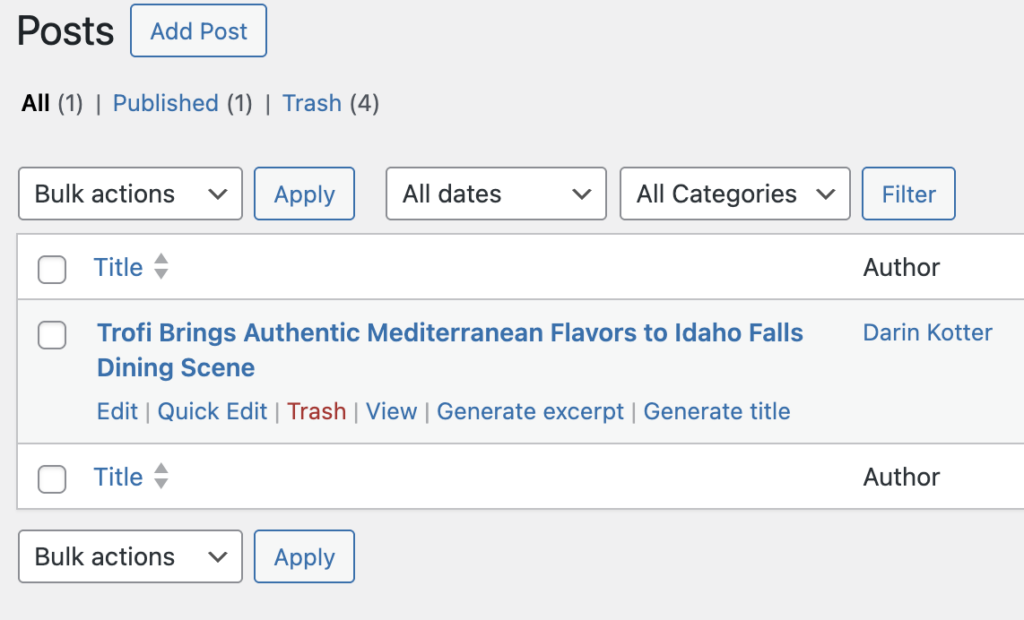
}At this point we now have the generate links showing on the post list screen:
JavaScript code
The rest of the functionality is all JavaScript/TypeScript based. We add an event listener to the links we added so anytime they are clicked we can run our functionality:
/**
 * Mapping of CSS class names to modal event names.
 */
const MODAL_EVENTS: Record< string, string > = {
	'ai-generate-excerpt-generation': 'aiExperimentsExtended:openExcerptModal',
	'ai-generate-title-generation': 'aiExperimentsExtended:openTitleModal',
};

/**
 * Handles row action clicks and dispatches modal events.
 *
 * @param event The click event.
 */
function handleRowActionClick( event: Event ): void {
	const target = event.target as HTMLElement;

	// Find matching class name.
	const matchingClass = Object.keys( MODAL_EVENTS ).find( ( className ) =>
		target.classList.contains( className )
	);

	if ( ! matchingClass ) {
		return;
	}

	event.preventDefault();

	const postId = parseInt( target.getAttribute( 'data-post-id' ) || '0', 10 );
	const restBase = target.getAttribute( 'data-rest-base' ) || 'posts';

	if ( ! postId ) {
		return;
	}

	// Dispatch custom event to open the appropriate modal.
	const eventName = MODAL_EVENTS[ matchingClass ]!;

	window.dispatchEvent(
		new CustomEvent( eventName, {
			detail: { postId, restBase },
		} )
	);
}

// Handle row action clicks.
document.addEventListener( 'click', handleRowActionClick );Clicking those links opens a modal that makes an API request to the proper WordPress Ability (registered by the AI plugin) and displays the results, allowing the user to accept or dismiss them.
Example showing how this is done when generating an excerpt:
/**
 * Generates an excerpt for the given post ID.
 *
 * @param postId The ID of the post to generate an excerpt for.
 * @return A promise that resolves to the generated excerpt.
 */
async function generateExcerpt( postId: number ): Promise< string > {
	const path = aiExperimentsExtendedData.excerptGeneration.path;

	return apiFetch( {
		path,
		method: 'POST',
		data: {
			input: {
				context: postId.toString(),
			},
		},
	} )
		.then( ( response ) => {
			if ( response && typeof response === 'string' ) {
				return response;
			}
			return '';
		} )
		.catch( ( error: any ) => {
			throw new Error( error.message || 'Failed to generate excerpt' );
		} );
}The key point here: the apiFetch call above hits an endpoint our plugin had nothing to do with—it’s entirely managed by the AI plugin. It deals with validating credentials, making the API request, validating the returned value, handling errors, etc. We just make the request and process what is returned however we want.
Finally we render the results in a modal and allow the user to choose to accept or not:
return (
	<>
		{ isOpen && (
			<Modal
				onRequestClose={ closeModal }
				isFullScreen={ false }
				size="medium"
				className="ai-excerpt-generation-modal"
			>
				{ isGenerating && (
					<div style={ { textAlign: 'center', padding: '20px' } }>
						<Spinner />
						<p>
							{ __(
								'Generating excerpt…',
								'ai-experiments-extended'
							) }
						</p>
					</div>
				) }

				{ ! isGenerating && error && (
					<div className="notice notice-error">
						<p>{ error }</p>
					</div>
				) }

				{ ! isGenerating && ! error && generatedExcerpt && (
					<>
						<TextareaControl
							label={ __(
								'Generated Excerpt',
								'ai-experiments-extended'
							) }
							value={ generatedExcerpt }
							onChange={ setGeneratedExcerpt }
							rows={ 5 }
							__nextHasNoMarginBottom
						/>

						{ updateError && (
							<div
								className="notice notice-error"
								style={ { marginTop: '10px' } }
							>
								<p>{ updateError }</p>
							</div>
						) }

						<div
							style={ {
								display: 'flex',
								justifyContent: 'flex-end',
								gap: '10px',
								marginTop: '20px',
							} }
						>
							<Button
								variant="tertiary"
								onClick={ closeModal }
							>
								{ __(
									'Cancel',
									'ai-experiments-extended'
								) }
							</Button>
							<Button
								variant="primary"
								onClick={ handleApply }
								disabled={ isUpdating }
								isBusy={ isUpdating }
							>
								{ __( 'Save', 'ai-experiments-extended' ) }
							</Button>
						</div>
					</>
				) }
			</Modal>
		) }
	</>
);There’s slightly more going on that’s not shown here, like saving the excerpt or title, handling asset builds, etc. and you can see all of it on GitHub. For a full demo of how this all works:
But hopefully this gives you a good idea of how easy it is to build on top of the AI plugin. I’d love to see what you’re building with this. If you’ve extended the AI plugin or have questions, feel free to share!